
The shortlist
- LFSA DigitalBest for a recurring job you want built and maintained
- DIY automation toolsBest when you want to own the setup
- A freelance builderBest for a defined project with handover
Have a task in mind? Put your time and revenue estimates into the free calculator.
What to check before you buy
- Know who fixes the workflow when an integration changes.
- Choose one recurring job you can describe and review.
- Count your setup and maintenance time alongside the software bill.
- Agree on what the system can do before giving it access.
- Measure recovered hours and additional sales separately. Revenue still has costs attached.
Start with the job you want done.
A client sends documents. Someone checks them, spots what's missing and writes the follow-up. That's a job we can define and build.
AI can help with the document checks and the draft. The workflow still needs rules for handling problems and someone to check the work.
At LFSA, an AI employee is one specific role built around that process. We start with drafts and give it more access with your approval.
How I compared the options
I looked at six things a buyer needs to settle: who builds it, who maintains it, how costs are set, approval rules, inspectable outputs and the type of job.
This is a comparison of buying approaches. LFSA's details come from what we offer on this site. The DIY examples link to the software provider’s guides. A freelancer's terms depend on the agreement you sign.
1. LFSA Digital
Best for a recurring job you want built and maintained.
You bring a job that's taking up your week. We build it into the tools you use and keep it running. You review the work.
The first step is a 30-minute call. We agree on the task and expected result. Within three working days, you get a written plan, access rules and setup plus monthly pricing.
The first 30 days are draft-only. Check the outputs. Count the corrections and the time you get back. Keep the role monthly if it earns its place.
You can see its history and a weekly operating report. We fix what breaks. You approve any new actions or access.
Who I'd recommend it to: An owner with recurring work who wants someone responsible for the system after launch.
Discuss one role30-minute call. A written plan and pricing before we build.
2. DIY automation tools
Best when you want to own the setup.
If someone on your team wants to build the workflow, a platform gives them the pieces. Zapier and n8n are two examples worth looking at.
Check the integrations you need and how usage is billed. Then decide who will test the workflow and handle a failed run. Put that time in your budget.
Self-hosting adds server and security work. n8n's documentation explains the technical knowledge required. Pick that route when you have someone who can take it on.
Who I'd recommend it to: A team with the time and skills to own the workflow. Start with a task you can test and undo.
3. A freelance builder
Best for a defined project with handover.
You know what needs to happen and want someone to build it. A freelancer can fit that job. The agreement matters as much as the demo.
Get the deliverables, testing and handover in writing. Ask who owns the accounts and who will support the workflow once the project ends. Include any ongoing maintenance in the quote.
Who I'd recommend it to: A business buying a bounded project with a clear plan for running it afterwards.
We also do one-time workflow builds with documentation and handover when ongoing operation isn't what you need.
Compare the options
Look past the launch. Decide who owns the work that comes after it.
On a small screen, scroll the table sideways to compare all three options.
| What to compare | LFSA managed role | DIY tools | Freelance build |
|---|---|---|---|
| Who builds it | We build the agreed role into your tools. | You or your team. | The builder, following your written agreement. |
| Who maintains it | We operate it and fix what breaks. | Your team or a separate service. | Confirm support in the contract. |
| What you pay for | Setup and monthly operation, quoted after we agree on the job. | Plan, usage and your team's time. | Project fee; software and support may be separate. |
| Approval rules | Draft-only for 30 days. You approve expansion. | You configure and test them. | Include them in the agreement. |
| What you can check | Outputs, history and weekly operating reports. | Your tests and the software provider’s guides. | Agreed acceptance tests and deliverables. |
| Best fit | A recurring job you want operated. | A workflow you want to own. | A defined project with handover. |
Find your fit
| Your situation | Where to start | Settle this first |
|---|---|---|
| You know the job and want it maintained. | LFSA managed role | The job, access rules and price. |
| Your team wants to build and own it. | DIY tools | Integrations and maintenance time. |
| You need one build with handover. | Freelance or fixed-scope project | Testing, ownership and support. |
| You're unsure which job to fix first. | AI in Your Business | What the $999 assessment includes and its guarantee. |
The $999 assessment includes a written plan and a five-page website. Managed-role setup and monthly costs are quoted separately.
See a role doing the work.
Admin Hire checks client documents, flags missing files and prepares follow-ups for review. Below is the queue from our working demonstration.
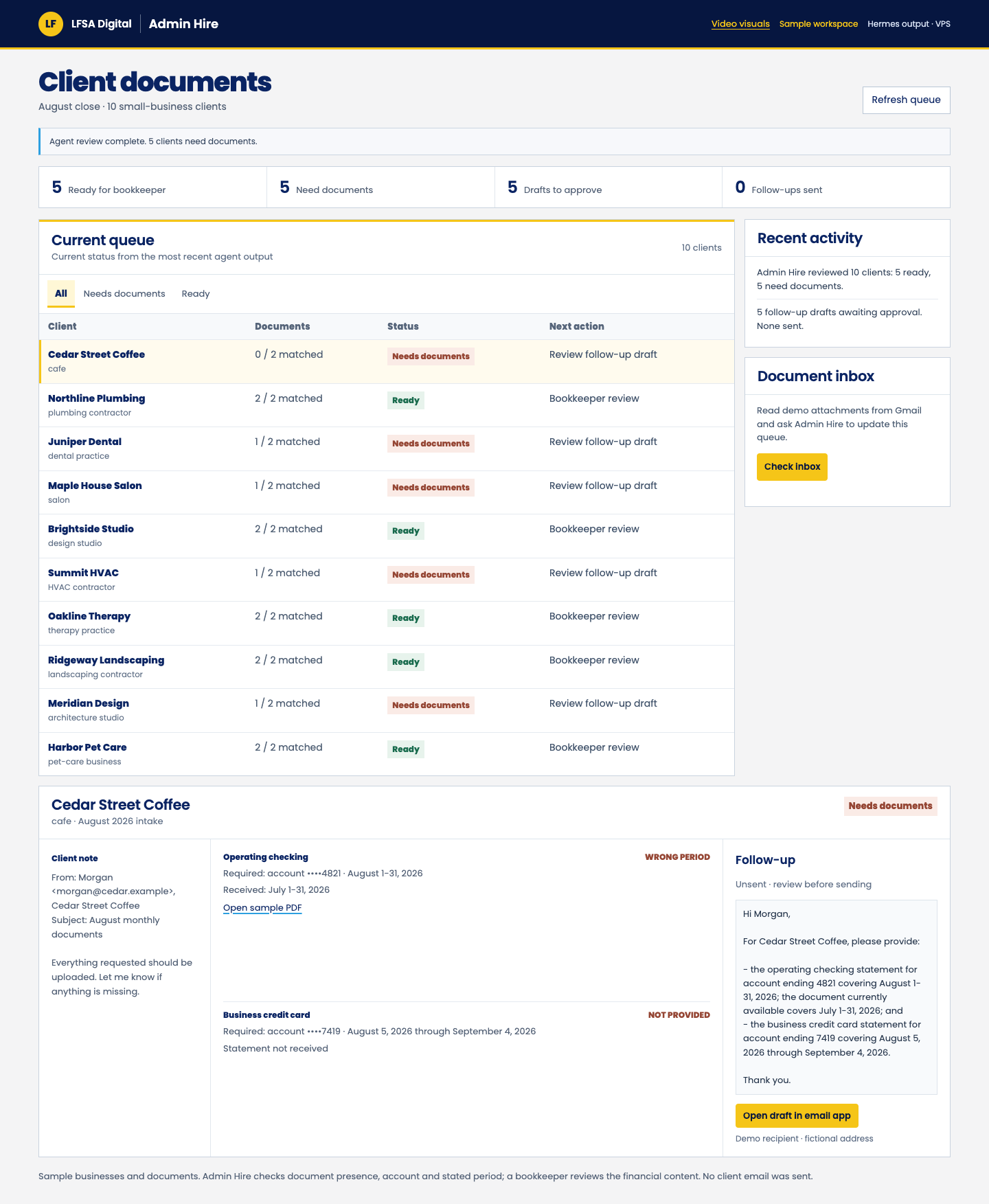
Watch the Admin Hire walkthrough or see more of our work.
For your role, we'll review accurate outputs, corrections and net time saved. If you want it to support sales, we'll agree on what to track. The demo itself doesn't establish a revenue result.
Questions before you commit
What is the best AI automation option for a small business?
My pick is LFSA Digital for an owner who wants a recurring job built and maintained for them. A DIY platform fits someone who wants to manage the setup. A freelancer fits a defined project with a handover plan.
How much does a managed AI employee cost?
We quote setup and monthly operation after agreeing on the job. The $999 AI in Your Business assessment is a separate service with a written plan and a five-page website.
How do I know if automation is worth it?
Measure the work as it runs today. Include the time spent reviewing output and correcting mistakes. Compare that with setup and running costs, then validate the result on your workflow.
Use the free ROI calculatorWhat happens if the AI gets something wrong?
Agree on how the work will be checked and how problems will be handled. LFSA starts with 30 days of draft-only validation. You approve any new actions or access.
How is a managed AI employee different from buying software?
A software subscription gives you the tools. You still need someone to set up the process and keep it working. With an LFSA managed role, we take care of the work we agree on.
What if I only need one workflow built?
A one-time project may be enough. Agree on testing, instructions, account ownership and support. LFSA also builds workflows and hands them over to your team.
Bring the job you want off your plate.
Tell me what's taking up your week and which tools you use. We'll discuss the task in a 30-minute call. You get a written plan and pricing before anything is built.
Discuss one role